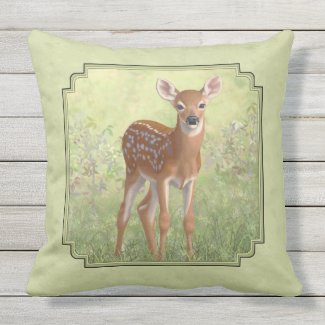
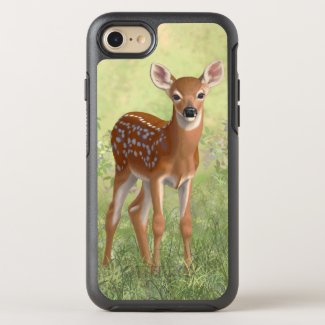
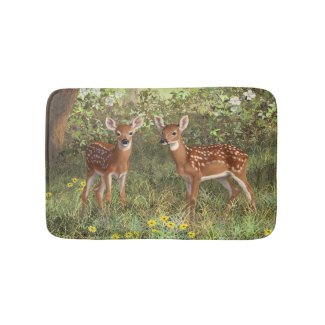
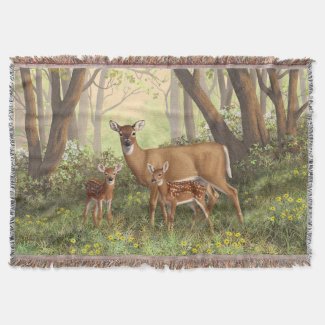
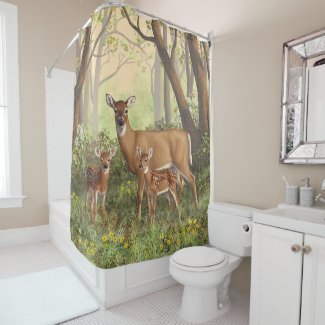
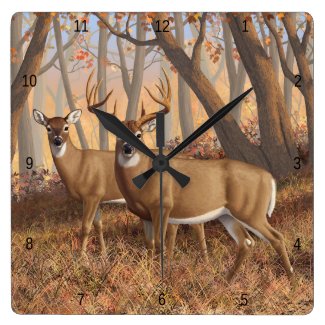
In my previous post I introduced several new whitetail deer paintings. I've now added some of those images to products in my Zazzle store. These products include everything from coffee mugs to throw pillows, stationary to shower curtains.Here are a few examples.
This is just a small sampling of the products available. Visit my store to see all the whitetail deer images and products.
Showing posts with label deer. Show all posts
Showing posts with label deer. Show all posts
Feb 11, 2017



Feb 3, 2017
New Whitetail Deer Paintings
I have five new whitetail deer paintings. The first one is all original, hand painted (digitally) from scratch. This features a buck and doe in autumn walking through the woods.

This next one is a modified version of the above scene. Because it is digital I was able to reuse some of the background, and the doe, with some adjustments. Obviously, the biggest change was converting the background from a fall scene to a spring scene, making things green and adding flowers. The buck, of course, is gone and in his place are his offspring, two adorable twin fawns.

In case you just have a thing for cute fawns I made a few more variations featuring just the fawns. One is the just the two fawns in the woods. Don't worry, they haven't been abandoned! Mom's just over browsing a bush off-screen. :)

And here's a version of just one fawn in case your wall space is better suited to a vertically oriented print.

And, just one more, a simplified version of the single fawn. This makes a better choice for a small print, greeting card, or other small product such as a phone case.

All these images are available as prints, greeting cards, throw pillows, tote bags, and more. Click the image you like to see product options for that image.
Remember, because these images are painted digitally, they can be modified somewhat fairly easily. So if you want a customized version contact me and let me know. For example, if you'd like the first image with just the buck, it wouldn't be too hard for me to remove the doe. So don't be afraid to ask.
This next one is a modified version of the above scene. Because it is digital I was able to reuse some of the background, and the doe, with some adjustments. Obviously, the biggest change was converting the background from a fall scene to a spring scene, making things green and adding flowers. The buck, of course, is gone and in his place are his offspring, two adorable twin fawns.
In case you just have a thing for cute fawns I made a few more variations featuring just the fawns. One is the just the two fawns in the woods. Don't worry, they haven't been abandoned! Mom's just over browsing a bush off-screen. :)
And here's a version of just one fawn in case your wall space is better suited to a vertically oriented print.
And, just one more, a simplified version of the single fawn. This makes a better choice for a small print, greeting card, or other small product such as a phone case.
All these images are available as prints, greeting cards, throw pillows, tote bags, and more. Click the image you like to see product options for that image.
Remember, because these images are painted digitally, they can be modified somewhat fairly easily. So if you want a customized version contact me and let me know. For example, if you'd like the first image with just the buck, it wouldn't be too hard for me to remove the doe. So don't be afraid to ask.
Feb 1, 2017
Deer Painting - Fawn WIP2
In my previous post I started blocking in a cute whitetail fawn. In this post I continue working the fawn's shading and fur.
With my "fur" brush, shown on the right here (Photoshop CS5), I start working the edges of the different colors to give them somewhat of a fur-like texture instead of just hard straight lines. I've started doing this below his ear in this image.

My fur brush is really just a simple elongated teardrop or bullet shaped brush stroke. Google how to create PS brushes to create your own brush. I won't get into PS basics here. But I'll give you my default settings for this shape to create a fur-like pattern. The most important thing here is to turn on Shape Dynamics and set the Angle Jitter Control to Direction so that you can control the direction of the fur by the direction of your brush stroke. Set the Size Jitter to about 20% and turn Control to Off. Next turn on Scattering and that to about 80%.

After getting all the edges furred up now we start blending those edges to give them a softer look. This harsh color change doesn't look very natural. To do this you can either use this fur brush with a Mixer Brush to blend the edges, or use a regular brush and click Transfer in the Brush panel (or click Tablet Pressure Controls Opacity at the top tool bar). I prefer to use a regular brush with Tablet Pressure Controls Opacity because the Mixer Brush tends to blur things too much. I want to blend the color tones without making the individual hairs too fuzzy.
Here you can see I've been working the edges to soften them. As you work the edges keep changing the color from one side of the edge to the other, overlapping them a few times. You don't want it to look like only one color overlaps the other. You want to go back and forth to get a more naturally blended look.

And here's the little cutie-pie all finished and in his natural surroundings. Feel free to leave comments if you have any questions.

With my "fur" brush, shown on the right here (Photoshop CS5), I start working the edges of the different colors to give them somewhat of a fur-like texture instead of just hard straight lines. I've started doing this below his ear in this image.

My fur brush is really just a simple elongated teardrop or bullet shaped brush stroke. Google how to create PS brushes to create your own brush. I won't get into PS basics here. But I'll give you my default settings for this shape to create a fur-like pattern. The most important thing here is to turn on Shape Dynamics and set the Angle Jitter Control to Direction so that you can control the direction of the fur by the direction of your brush stroke. Set the Size Jitter to about 20% and turn Control to Off. Next turn on Scattering and that to about 80%.

After getting all the edges furred up now we start blending those edges to give them a softer look. This harsh color change doesn't look very natural. To do this you can either use this fur brush with a Mixer Brush to blend the edges, or use a regular brush and click Transfer in the Brush panel (or click Tablet Pressure Controls Opacity at the top tool bar). I prefer to use a regular brush with Tablet Pressure Controls Opacity because the Mixer Brush tends to blur things too much. I want to blend the color tones without making the individual hairs too fuzzy.
Here you can see I've been working the edges to soften them. As you work the edges keep changing the color from one side of the edge to the other, overlapping them a few times. You don't want it to look like only one color overlaps the other. You want to go back and forth to get a more naturally blended look.

And here's the little cutie-pie all finished and in his natural surroundings. Feel free to leave comments if you have any questions.

Jan 24, 2017
Deer Painting - Fawn WIP
Work-in-progress of a whitetail fawn in a digital deer painting I'm doing. Here I'm just sharing the initial block in of colors and shading. This looks a bit like a paint-by-number at this pointing. First, the whole fawn. Then a close-up of a blocked in area.


Next post I'll start blending the different shades with m fur brush.


Next post I'll start blending the different shades with m fur brush.
Dec 1, 2016
Wildlife Greeting Card Sale
Just in time for the Christmas holidays I've lowered my Pixels/FineArtAmerica greeting card prices by up to 40% for all images! Of course, at these time of year the greeting cards you're most likely to be interested in features artwork with a Christmas theme. Here are some of those images. Click an image below and then select Greeting Cards from the drop down menu on the right to choose your card options. You can buy any greeting card as a single card, or in packs of 10 or 25. You get a better price per card with the packs. You can order blank cards or have them printed with your own personalized greeting inside.


Oct 21, 2016
Coffee Mugs Featuring Animals
I was just thinking about how many people enjoy beautiful artwork but don't have the money or wall space to buy original paintings or even prints. There's only so much space on your walls. But there are so many ways to enjoy art without owning an original painting or fine art print, from calendars to coffee mugs. Practically everyone drinks coffee or tea, or at least keeps coffee mugs on hand for guests who do. Who doesn't own a coffee mug, after all? So why have a plain black or white mug when you could use that mug as a canvas to display some artwork?
Many people are already starting their Christmas shopping. Personalized coffee mugs are just the right size and price for stocking stuffers. So, for the animal lovers you know, how about a coffee mug featuring artwork with their favorite animal, personalized with their name, or the name of an event or date of special meaning? Mugs for dog lovers, cat lovers, horse lovers, bird lovers, duck hunters, deer hunters, and more.
Many people are already starting their Christmas shopping. Personalized coffee mugs are just the right size and price for stocking stuffers. So, for the animal lovers you know, how about a coffee mug featuring artwork with their favorite animal, personalized with their name, or the name of an event or date of special meaning? Mugs for dog lovers, cat lovers, horse lovers, bird lovers, duck hunters, deer hunters, and more.
Oct 1, 2016
New iPhone 7 Cases Now Available on Pixels
Pixels.com, aka Fine Art America (FAA does not have as many products as Pixels, however), has updated their phone cases and now carries iPhone 7 and 7 Plus cases. All my artwork that was available on iPhone 6 cases has now been updated to be available on the 7s as well. I have sorted my Pixels store into categories by subjects. I have Birds, Deer, Wild Cats, Wild Dogs, Horses, other Domestic Animals, and a misc other wildlife category to make it easier for you to find the products in the subjects you like best.
I have been doing a lot of bird paintings over the past couple years so the Birds category is my biggest now with about 70 images to choose from. It has a wide variety of bird species, mostly songbirds like bluebirds, chickadees, cardinals, and goldfinches, but also hummingbirds, ducks, a crow, a pileated woodpecker, and a bald eagle. Here are a couple samples from the Birds category.


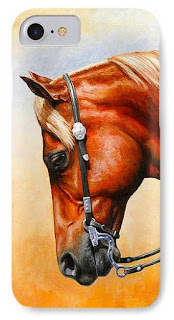
Next most popular subject is Horses. There are several breeds to choose from including Quarter Horses, Morgan, Friesian, and some warmbloods such as the Hanoverian. All come in full color versions but I've also made a few versions in sepia to give an aged photo effect. This works particularly nice for the Western Quarter Horse and Native American Pinto War Horse images. Here they are, the quarter horse in full color, and the pinto in sepia.

In the Deer section I have both mule deer and whitetail deer to choose from. These make great gifts for the outdoorsman or deer hunter you know.


These are not limited to iPhone 7 cases. On each page there is a drop-down menu on the right where you can choose from new or older iPhone cases, as well as Galaxy cases. Check out all the iPhone 7 cases by category here:
Phone cases featuring bird paintings
Phone cases featuring deer art
Cases featuring domestic animals
Phone cases with horse paintings
Cases with wild dogs such as wolves and foxes
Cases with wild cats like tigers and leopards
I have been doing a lot of bird paintings over the past couple years so the Birds category is my biggest now with about 70 images to choose from. It has a wide variety of bird species, mostly songbirds like bluebirds, chickadees, cardinals, and goldfinches, but also hummingbirds, ducks, a crow, a pileated woodpecker, and a bald eagle. Here are a couple samples from the Birds category.
Next most popular subject is Horses. There are several breeds to choose from including Quarter Horses, Morgan, Friesian, and some warmbloods such as the Hanoverian. All come in full color versions but I've also made a few versions in sepia to give an aged photo effect. This works particularly nice for the Western Quarter Horse and Native American Pinto War Horse images. Here they are, the quarter horse in full color, and the pinto in sepia.
In the Deer section I have both mule deer and whitetail deer to choose from. These make great gifts for the outdoorsman or deer hunter you know.
These are not limited to iPhone 7 cases. On each page there is a drop-down menu on the right where you can choose from new or older iPhone cases, as well as Galaxy cases. Check out all the iPhone 7 cases by category here:
Phone cases featuring bird paintings
Phone cases featuring deer art
Cases featuring domestic animals
Phone cases with horse paintings
Cases with wild dogs such as wolves and foxes
Cases with wild cats like tigers and leopards
Subscribe to:
Posts (Atom)
