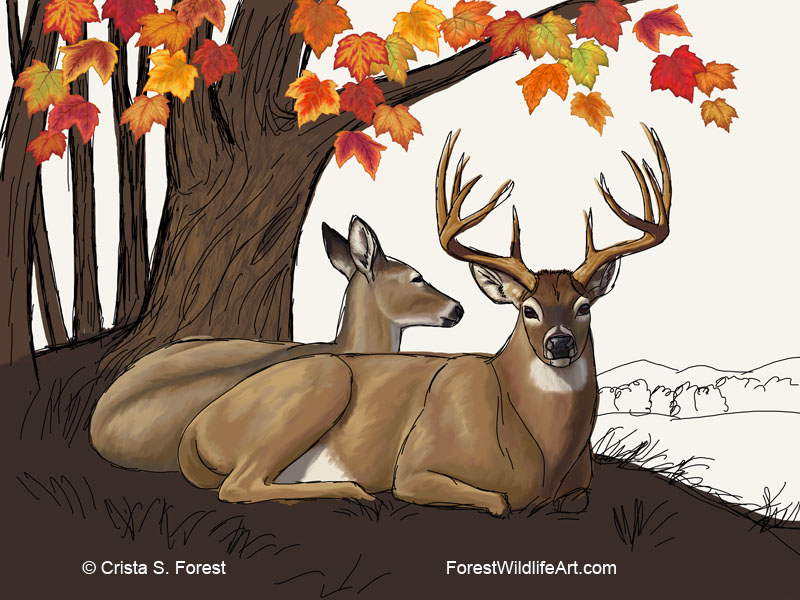
After mostly finishing up the tree bark on my deer painting I decided I wanted to change the dimensions of the canvas. This is another advantage of painting digitally. You can change your mind about things and alter them a lot easier than on a real canvas painting. Here I extended the digital canvas size vertically to create a square, rather than rectangular, painting. You can see where the top line used to be, where the leaves stop. I also extended the bottom of the image a little bit, but not as much as the top because I didn't want the deer to be dead center in the image. Having them off-center a little gives a more pleasing composition.
So the last few days I've been working on extending the tree trunks and branches up to fill that new extra space. I'll obviously need to add more maple leaves too.
OK, so now you're probably wondering, why did I give myself that extra work? Well, as you may know from previous posts, I license my art to manufacturers for use on various products. Creating a square canvas gives me more flexibility, making the artwork suitable for more products. The square image above can now be cropped vertically for use on something like flags, or cropped horizontally for things like placemats, or even cropped into a circle for use on plates. The original horizontal version would not have worked for flags or plates. So by extending it vertically I've just given myself at least 2 more potential licensing options.
Well, now back to painting branches and leaves!
A blog about animals including wildlife, horses, dogs, cats, and other domestic animals, as well as the artwork I create from them.
Oct 20, 2015
Oct 17, 2015
Digital Deer and Maple Tree Painting - WIP4
More work done on the background here, the most obvious being the addition of the distant background and sky. Although not all that realistic for the time of day in this scene, I decided to color the sky more like sunset to maintain color harmony with the autumn leaves.
I've also added more texture to the tree trunks. To better show the trunk detail I have hidden my sketch layer for this shot, as you may have noticed. I didn't delete it, though. I still have it in my working file to display as needed.
Here's a detail of the bark:
Still working in ArtRage on this part of the painting.
I've also added more texture to the tree trunks. To better show the trunk detail I have hidden my sketch layer for this shot, as you may have noticed. I didn't delete it, though. I still have it in my working file to display as needed.
Here's a detail of the bark:
Still working in ArtRage on this part of the painting.
Oct 16, 2015
Digital Deer and Maple Tree Painting - WIP3
More progress on my autumn doe and buck painting. I spent some time working on the tree trunks, getting those roughed in. For this part I switched from Photoshop to ArtRage to get a more painterly look in the tree bark. Fortunately, the creators of ArtRage, Ambient Design, had Photoshop users in mind when they developed this software, so moving from Photoshop to ArtRage and back is very easy. ArtRage imports Photoshop's PSD files and preserves all your image's layers and transparency. Again, one of the big advantages of painting digitally is being able to create layers, so having ArtRage keep those intact is really important. It will also preserve all that so exporting back to Photoshop goes just as smoothly.
Here I was able to paint the tree bark and ground behind all the other layers. This saves a lot of time not having to paint around each leaf as I would have to do if I'd painted from front to back with traditional oils.
Detail is often more fun for me than blocking stuff in so I took a little break from the trees to detail the buck's eyeball. What big, beautiful "Bambi" eyes deer have!
All right, back to work on the trees now ...
Here I was able to paint the tree bark and ground behind all the other layers. This saves a lot of time not having to paint around each leaf as I would have to do if I'd painted from front to back with traditional oils.
Detail is often more fun for me than blocking stuff in so I took a little break from the trees to detail the buck's eyeball. What big, beautiful "Bambi" eyes deer have!
All right, back to work on the trees now ...
Oct 14, 2015
Digital Deer and Maple Tree Painting - WIP2
Some more progress on the deer painting. Here I've blocked in the doe and buck. As mentioned in my previous post, one of the advantages of painting digitally is being able to paint without painting over your sketch outlines. I just created a new layer behind the sketch and painted on that.
This is just a rough block-in to get the shape, shadows, and basic colors down, just as you would do with traditional oils. So in this case I just used a basic round Photoshop brush. Later I'll use a special brush I created for adding the fur texture to the deer's coat. I'll explain how to create that brush in a future post.
Oct 10, 2015
Digital Deer and Maple Tree Painting - WIP1
I decided I needed to take a break from bird paintings for a bit so I'm now working on a painting of two whitetail deer lying under a maple tree in autumn. So here's my first WIP (Work-In-Progress) post for this painting.
To save myself some time I'm reusing some of the maple leaves I created in Photoshop for my previous painting of birds in autumn at a bird feeder. I moved them around a bit to approximately where I want the maple's tree branches to hang. Then I created another layer in PS to sketch out the rest of the composition.
One of the nice things about painting digitally is being able to work the painting in any order. Normally, with traditional oil painting, you work from back to front. You paint the most distant background first and work your way forward until you finally finish the main subject and foreground. But in digital painting it's easy for me to create a new layer behind the existing leaves and sketch and paint the tree without having to try to paint around each leaf.
Painting digitally also allows me to keep my sketch available throughout the entire painting so I can continue to reference it and stay on track. With traditional painting the sketch gets painted over and if you start to veer off your original design you might not realize it until it's too late and you have a lot of rework to do. Keeping the sketch overlay keeps things simpler and the layer can be hidden at any time to see how the painting is coming along without the scribbly black lines in the way.
So above is the first stage of my painting, getting the composition laid out and the animals and trees outlined. Next I'll start filling things in and share that in my next WIP post.
To save myself some time I'm reusing some of the maple leaves I created in Photoshop for my previous painting of birds in autumn at a bird feeder. I moved them around a bit to approximately where I want the maple's tree branches to hang. Then I created another layer in PS to sketch out the rest of the composition.
One of the nice things about painting digitally is being able to work the painting in any order. Normally, with traditional oil painting, you work from back to front. You paint the most distant background first and work your way forward until you finally finish the main subject and foreground. But in digital painting it's easy for me to create a new layer behind the existing leaves and sketch and paint the tree without having to try to paint around each leaf.
Painting digitally also allows me to keep my sketch available throughout the entire painting so I can continue to reference it and stay on track. With traditional painting the sketch gets painted over and if you start to veer off your original design you might not realize it until it's too late and you have a lot of rework to do. Keeping the sketch overlay keeps things simpler and the layer can be hidden at any time to see how the painting is coming along without the scribbly black lines in the way.
So above is the first stage of my painting, getting the composition laid out and the animals and trees outlined. Next I'll start filling things in and share that in my next WIP post.
Sep 29, 2015
New Autumn Birds Painting
Recently finished is a new digital painting of birds in autumn. This painting was done in Photoshop CS5 and a Wacom Cintiq
monitor-tablet. This was painted entirely by hand. There are no
photographic elements or photo manipulation in this image.
As you can see, here we have a scene of several bird species around a small wooden bird feeder. Bird species include a black-capped chickadee, a blue jay, a red-breasted nuthatch, a northern red cardinal, and an eastern bluebird. Bright orange, red, and gold maple leaves bring the beauty of fall colors into your home with this image in your choice of paper, canvas, metal, or acrylic fine art prints.
In addition to prints there are also other ways to at home or on the go with throw pillows, phone cases, tote bags, and apparel.
In addition to those items above from Pixels.com, I have many more items available featuring this image in my Zazzle Store. Fall season holidays, like Thanksgiving, are just around the corner. With products ranging from coffee mugs and coasters, to wallets and wall clocks, bird lovers will find plenty of ideas for autumn theme decorating and gift giving.
As you can see, here we have a scene of several bird species around a small wooden bird feeder. Bird species include a black-capped chickadee, a blue jay, a red-breasted nuthatch, a northern red cardinal, and an eastern bluebird. Bright orange, red, and gold maple leaves bring the beauty of fall colors into your home with this image in your choice of paper, canvas, metal, or acrylic fine art prints.
In addition to prints there are also other ways to at home or on the go with throw pillows, phone cases, tote bags, and apparel.
In addition to those items above from Pixels.com, I have many more items available featuring this image in my Zazzle Store. Fall season holidays, like Thanksgiving, are just around the corner. With products ranging from coffee mugs and coasters, to wallets and wall clocks, bird lovers will find plenty of ideas for autumn theme decorating and gift giving.
Sep 8, 2015
Wolves on Wallets
I've been adding a lot of items to my Zazzle store so there will be lots of stuff to choose from for the upcoming holiday shopping season. Some are Christmas themed but many would make great holiday gifts whether Christmas themed or not.
Today I'm going to showcase some wolves on wallets, coin purses, clutches, and other small bags.These are just a few samples of what you can find in the Store. See more products with wolves in my Zazzle Store here.
Subscribe to:
Posts (Atom)